
You've paid the fees, sent the documents and started planning your move or your company's next hire. Then the portal returns no record, or the same status stays on screen while your sponsor says the application is progressing.
The useful question isn't just whether the file is approved. It's whether you're checking the right authority, using the right identifiers and waiting for the right document. Tracking application status works when each check leads to a clear next action, not another round of refreshing.
Find the Right Portal for Your Visa Application
The emirate where your application was filed determines the tracking portal, not your nationality or home address. A Dubai resident can be checking a file handled through a federal channel, so don't choose the portal from your address alone.
The UAE government's application and tracking guidance directs Dubai applications to the General Directorate of Residency and Foreigners Affairs–Dubai (GDRFA Dubai), and applications filed in the other listed emirates to the Federal Authority for Identity, Citizenship, Customs and Port Security (ICP). This routing applies across entry permits, residence permits, visit visas and related immigration services.
Visa tracking route by filing emirate
| Where the Visa Was Filed | Authority | Tracking Route | Note |
|---|---|---|---|
| Dubai | GDRFA Dubai | GDRFA Dubai status service | Routed by filing emirate, not by nationality or residence |
| Abu Dhabi, Sharjah, Ajman, Umm Al Quwain, Ras Al Khaimah or Fujairah | ICP | Smart Services, tracking option | The UAE government's tracking instructions describe an application number typically starting with 010 |
| Any emirate, ICP account holder | ICP | My Applications or My Requests | Shows files linked to your account, not every application filed with another authority |
| Filed under the wrong emirate | Authority identified on the actual filing receipt | Re-check the filing emirate on the receipt | Confirm before resubmitting anything |
A no-record result isn't a rejection notice. Treat it as a routing or identification problem first; the portal may be searching a different authority's records.
Find the filing location on the receipt
Look for the issuing authority, service heading and application reference on the submission receipt. If your sponsor or public relations officer (PRO) filed the application, ask for the actual receipt rather than a message saying it was submitted.
Don't infer the filing emirate from the typing centre's address, your employer's office or where you intend to live. If the receipt isn't clear, ask the filer to identify the authority that accepted the transaction.
Visa validity checking is also separate from tracking a pending application. Choose the service that answers your current question: progress on a request, or validity of an issued document.
Practical rule: Write the filing emirate beside the application reference before opening a portal.
Details to Keep Ready and How to Log Each Check
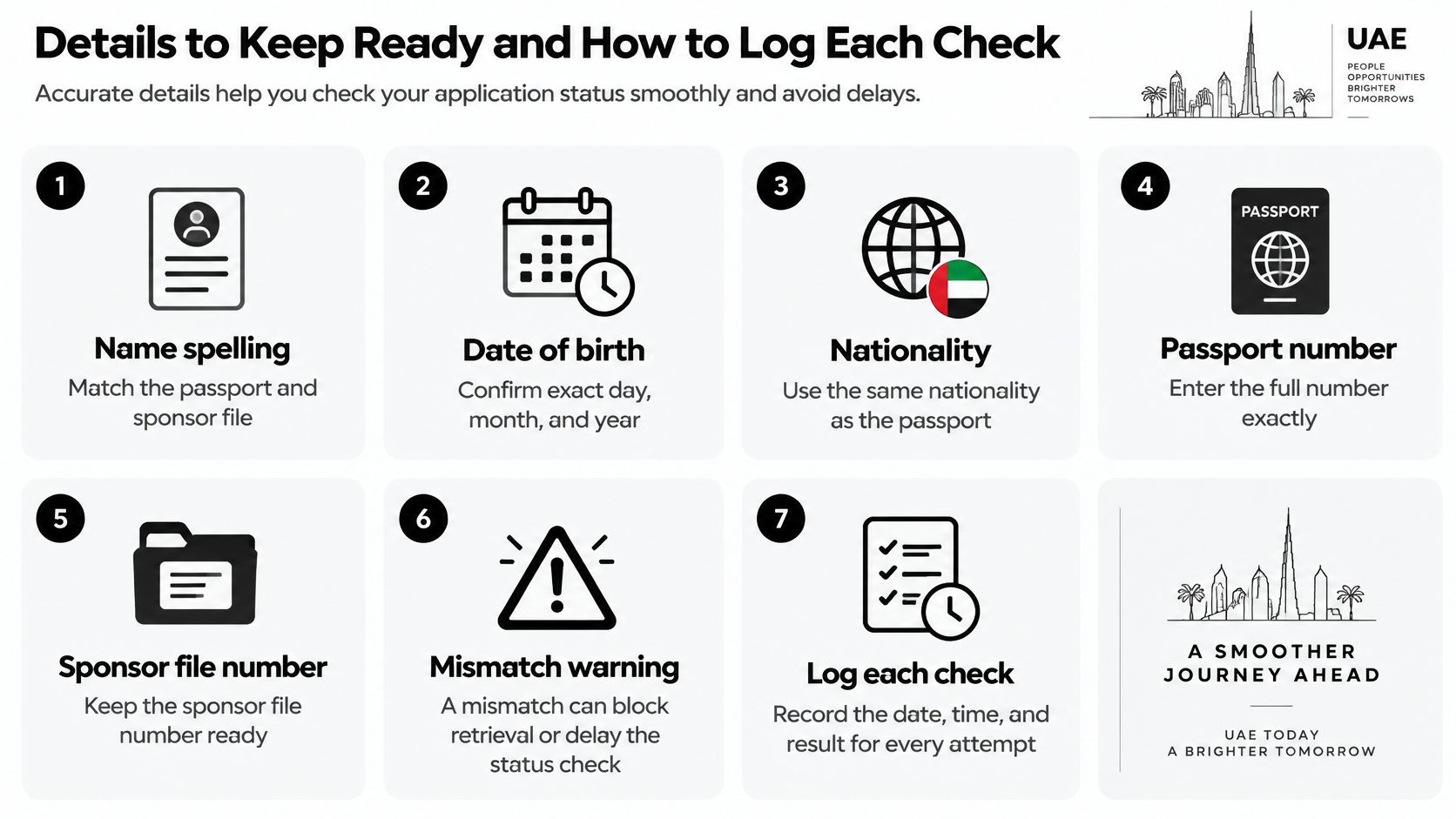
Start with the details that must match the passport and sponsor file: name spelling, date of birth, nationality, passport number and sponsor file number. A mismatch can prevent retrieval or trigger a correction request even when payment has succeeded.
The ICP service workflow separates application submission, payment and receipt of the final product. Keep evidence of each stage rather than treating a payment receipt as a complete application record.
Build a usable file pack
- Save the identifiers: Keep the application or request number and transaction number under separate labels.
- Keep payment evidence: Store the receipt with the payment date visible.
- Verify contact details: Confirm which email address and mobile number are linked to the file and who can access them.
- Preserve document versions: Retain each uploaded document with its upload date. Don't overwrite an earlier version.
- Record sponsor details: Include the sponsor's name, contact person and sponsor file number.
- Capture each result: Save a screenshot or PDF showing the status and the date and time of the check.
A shared folder is useful if the applicant, sponsor and PRO all need access. Restrict access to passport copies and personal information; a convenient tracking process shouldn't expose the entire file to everyone in the business.
Log the next action, not just the label
After each check, record the submission date, authority, reference number, latest status and next action in a spreadsheet. Assign that action to a named person, such as the sponsor's administrator or the applicant, so everyone isn't assuming someone else will respond.
Compare any document request against the original submission before uploading again. The authority may need a clearer scan, a corrected field or a different document, not another copy of everything.
Respond only through the official channel identified for the transaction. Never close the internal log solely because the tracker changes; retain confirmation of the document or service delivered.
How to Check Your Visa Status Step by Step
Use the receipt as your entry guide, not information copied from an old application. A renewal, family application or investor file can have a different reference from an earlier transaction involving the same passport.
The screens you encounter may ask for different combinations of identifiers. Follow the fields on the official service you've opened rather than trying to enter every number you possess.
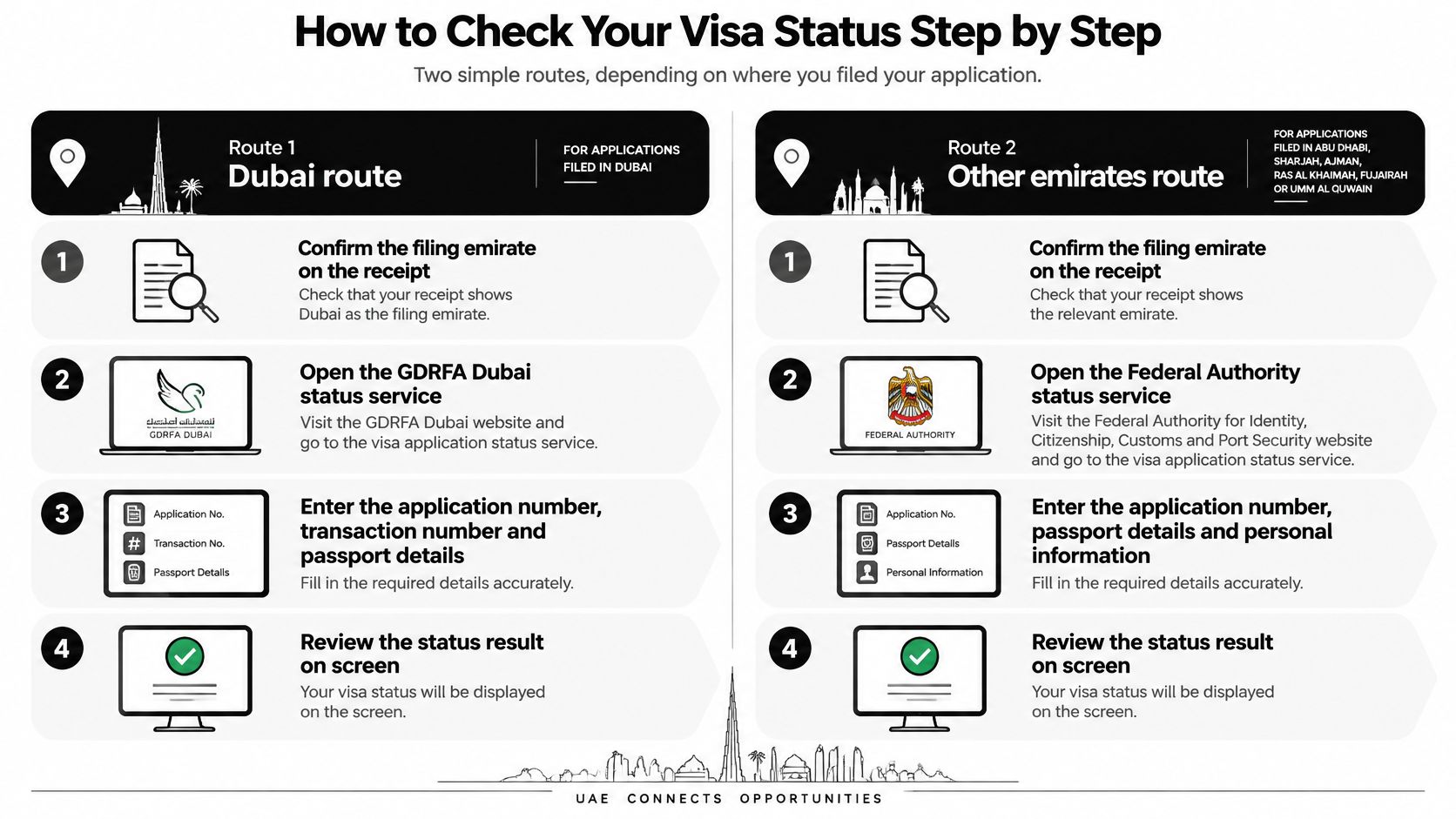
Dubai route
Confirm Dubai as the filing emirate on the receipt. Don't proceed just because you live in Dubai. Choosing the authority incorrectly is the earliest avoidable error.
Open the GDRFA Dubai status service. Access the official government service directly rather than through a sponsored search result or a payment request received from an unsolicited message.
Enter the identifiers requested on that screen. For the status inquiry requiring them, use the application number, transaction number and payment date exactly as printed. The transaction number doesn't belong in the application-number field.
Complete email verification if requested. Use the email linked to the application. If the sponsor controls that inbox, arrange access to the verification message rather than entering an unrelated address.
Record the displayed result. Save the status with the check time and any accompanying instructions. Capture the full message, not just the coloured status badge.
A payment date deserves particular care. Use the receipt's date and the date format requested by the form, rather than the day you transferred money to an intermediary.
ICP route
Open ICP Smart Services. Confirm you're using the official authority service before entering personal information.
Select the application-tracking option. An Emirates ID tracking workflow answers a different question from a visa application inquiry.
Enter the application number from the receipt. Preserve leading digits and check for spaces introduced when copying from a PDF or message.
Use My Applications or My Requests if you're tracking through an ICP account. This is an alternative way to locate linked files, particularly when you're managing several requests.
Save the status and check date. Include any modification request or authority message in the tracking log.
If your account doesn't show the expected file, don't conclude that it was never submitted. Ask whether it was filed through a sponsor's or service provider's account and obtain the corresponding receipt.
Read the whole result
A useful result lets you associate the status with the correct application and identify whether an action is outstanding. Read any available remarks, attachments or message-centre notices before deciding the file is waiting.
Check again after an authority notification or a requested correction has been processed. Repeated checks throughout the day won't resolve an unanswered document request or make an officer review the file sooner.
A screenshot proves what the portal displayed at that moment. It doesn't explain why the file is waiting.
What Each Status Label Really Means
Payment recorded is not approval. A tracker label describes a stage, but it rarely explains every operational consequence or tells you when to book a flight.
Use the labels below as working interpretations, not a promise that every portal uses identical wording. Each label should trigger a specific check rather than a guessed completion date.
Status labels, meanings and limits
| Status Label | What It Usually Means | What It Does Not Confirm |
|---|---|---|
| Payment recorded | Fees cleared and linked to the file | That the application has been accepted or reviewed |
| Submitted | Authority has received the application | That review has started or the outcome is positive |
| Under review | File is with an officer or department | Approval date or permission to travel |
| Returned for modification | Correction or missing document requested | That the file is rejected |
| Approved | Decision made in your favour | That the entry permit is in your hands or dependent steps are complete |
| Completed or issued | Final document or card issued | That the next business step can start without checking validity dates |
Turn the label into an action
For a submitted file, retain the acknowledgement and check for requests. During review, monitor the relevant medical fitness, Emirates ID or residence stages separately where they apply; a visa review label doesn't certify their completion.
Returned for modification calls for a targeted correction through the channel named on the file. Read the wording carefully before replacing documents, especially if the request concerns sponsor information rather than the applicant's passport.
Dubai's official GDRFA application status tracker recommends checking visa status and validity before entering the emirate to avoid visa fraud. An approval message forwarded by an agent isn't a substitute for checking the official record and document.
The same discipline is useful in other immigration systems. For employers handling US processes alongside UAE expansion, Contigo Labor Solutions' guide to understanding FLAG statuses for wage determinations offers a separate status-decoding resource; its labels and procedures aren't UAE rules.
There's no universal processing period that fits every application category and authority. If a label remains unchanged, check the message centre and the authority's published service time for that specific service before following up. Ask what is outstanding, who must act and whether the authority needs anything further from you.
Tracking Company Formation, PRO and Other Files
A company-formation file won't appear in a visa tracker. Licensing, immigration, medical and identity transactions have their own records, even when a service provider manages them as part of the same business-setup package.
Keep separate references for each transaction. A single folder named “company setup” is convenient, but it isn't a tracking system unless someone can identify the authority and outstanding action for every file.
Where non-visa files are tracked
| File Type | Responsible Authority | Where to Track | Check Note |
|---|---|---|---|
| Mainland company formation | Emirate licensing authority, usually the Department of Economy and Tourism in Dubai | Licensing file with that authority | Check after every notice |
| Free zone company formation | The free zone that issued the application | That free zone's file record | Ask for the review window in writing |
| PRO transactions | Authority where the transaction was filed | Same authority's status channel | Check weekly and keep the receipt |
| Medical, Emirates ID and residence stages | Authority handling the stage that follows a visa | Relevant stage's record, linked operationally to the visa file | A delay can hold dependent steps |
| Investor or Golden Residency | ICP or GDRFA Dubai for the immigration application, with any relevant nominating body | Responsible authority's application channel | Confirm the route in writing |
For licensing work, use a dedicated trade licence status check rather than trying to interpret immigration progress as evidence that the business licence is ready.
Manage the dependencies
The Federal Authority for Identity, Citizenship, Customs and Port Security reported 22,071,418 entry permits and 4,520,694 residence permits issued in 2025. Those totals illustrate the scale of immigration administration, but they don't establish a waiting time for your particular file.
A missing document can hold an application that another transaction needs before it can proceed. Say an investor's residence process depends on company documents: chasing the residence application without resolving the licensing request won't remove that obstacle.
Ask the licensing authority or free zone for the expected review window in writing. For routine PRO work, I'd use a weekly internal review unless an authority notice or deadline calls for earlier action.
Keep the payment receipt even when the PRO dashboard says paid. If the payment hasn't been matched to the intended company file, the useful follow-up is a reconciliation request showing the receipt and file reference, not another payment.
Assign an owner to every dependent step. The person coordinating the whole setup needs to know which transaction is preventing progress, not merely which portal was checked most recently.
Fixing Missing Records and When to Escalate
| Symptom | Likely Cause | What to Do |
|---|---|---|
| No record found | Wrong emirate or authority, or application number confused with transaction number | Re-check the filing emirate and identifiers from the receipt |
| Details differ from the passport | Spelling, date of birth or nationality mismatch | Stop and contact the authority with a passport copy through its secure official channel |
| Status unchanged for a long time | File waiting in review or a document request not seen | Check the message centre and linked email, then contact the authority |
| Request you never saw | Notice sent to an old email or phone | Update contact details and check the linked inbox |
| Payment made, status not updated | Payment may not yet be linked to the file | Keep the receipt and payment date, then ask for confirmation |
Escalate with a complete record
Re-check the identifiers against the receipt. Compare the actual characters rather than relying on a number saved in a chat.
Confirm the filing emirate and authority. Ask the filer to resolve any disagreement between the receipt and the portal being used.
Check the linked email and message centre. Include spam folders and the sponsor's inbox where appropriate.
Contact the authority through its official channel. Provide the reference number, a dated screenshot, payment receipt and a concise description of the problem.
Consider resubmission only if the authority confirms the file is missing. Obtain instructions on whether to create a new request or correct the existing transaction.
Write a question the support officer can answer: whether the application exists, whether a correction is outstanding, or whether payment has been allocated. A long account of your travel plans won't replace the identifiers needed to locate the record.
If the delay concerns an employment transaction rather than visa issuance, use the relevant Ministry of Labour inquiry services route to identify the employment-side issue. Don't assume the immigration helpdesk can resolve it.
Keep follow-ups proportionate
After a correction, allow the authority the period it specifies for processing the update. If no period is given, ask for the applicable review window, then send a written follow-up if the record remains unchanged after checking for messages.
Legal escalation is jurisdiction-specific. LegalWeg's resource on how to bring legal action over immigration delays concerns a German procedure, not a remedy to apply to a UAE file; UAE disputes require locally qualified advice.
Avoid the duplicate shortcut: A fresh application can leave you with competing records, extra payments and another administrative problem to explain.
Keep a dated contact log with the channel used, response received and promised next action. The next conversation should start from facts rather than memory.
Confirm Approval Before You Travel or Start Work
An approval notification is a milestone, not your entire go-ahead checklist. Before committing to travel or an employment start date, verify the document and the permissions relevant to that particular activity.
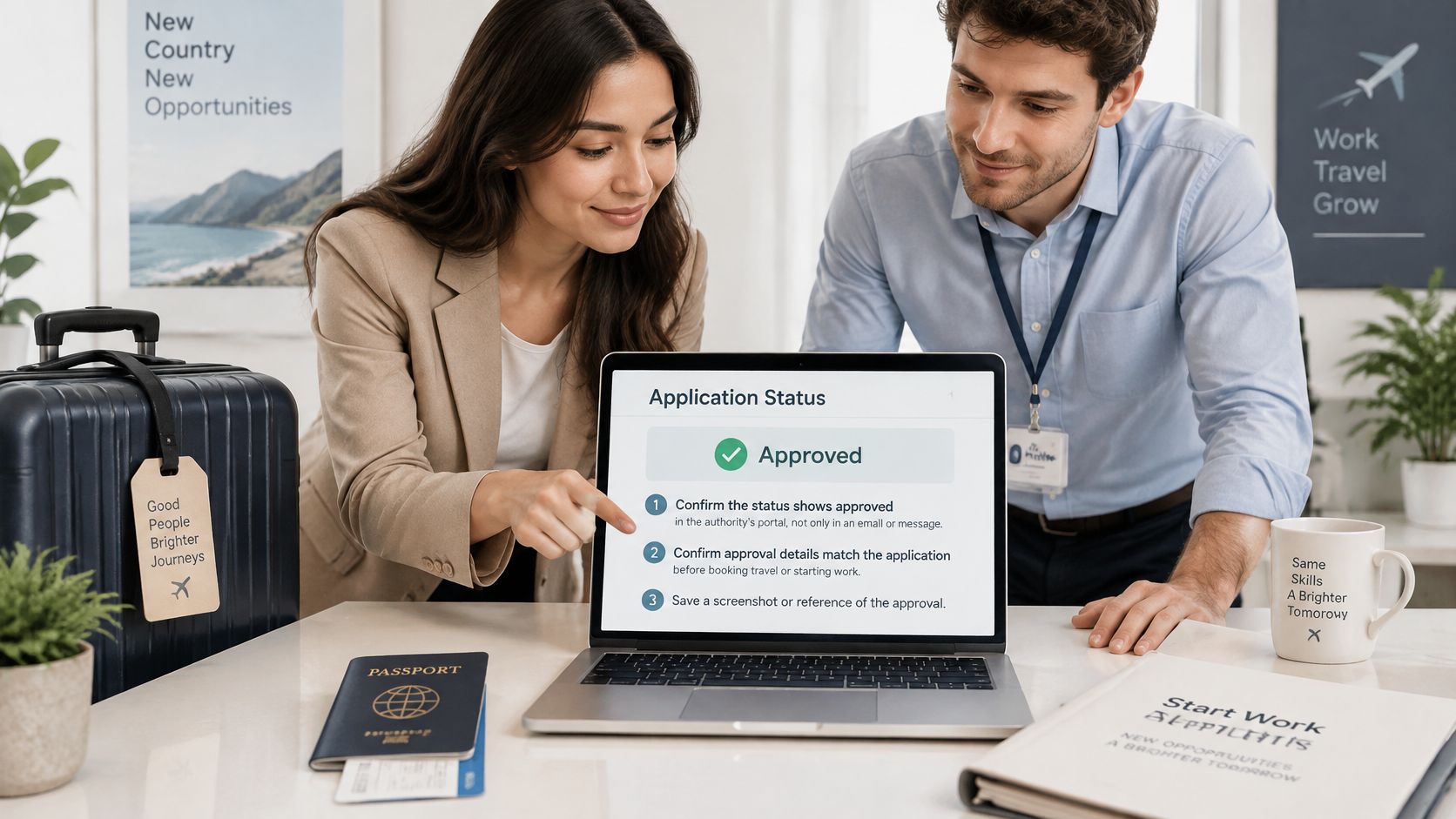
Make the go-or-no-go decision
Confirm the decision in the authority's portal. Don't rely only on a forwarded email, messaging-app screenshot or verbal assurance.
Obtain the issued permit or document. Receive it through the sponsor or official channel and check that it belongs to the correct applicant.
Read its validity dates and conditions. Confirm that the intended travel or activity falls within the document's scope.
Verify the dependent requirements for your next action. These may include medical testing, residence issuance, identity processing or the appropriate work authorisation. Use Emirates ID tracking guidance for the identity stage rather than assuming it follows the visa status automatically.
Commit only when the relevant checks are satisfied. Travel and starting work are separate decisions. An entry permission isn't, by itself, confirmation that employment may begin.
Approval visibility means you can see a favourable decision. Legal readiness means you hold the required document and have met the conditions for what you intend to do. Some residence-related steps may occur after entry, so verify the sequence for your permit instead of waiting for unrelated stages or starting prematurely.
Give the file a clear end point
An early start on a half-finished file can create avoidable travel changes, onboarding disruption and compliance questions. A short wait for documentary confirmation is usually easier to manage than explaining why someone acted on an incomplete status.
If several authorities are involved, the sponsor's administrator, an authorised PRO or a provider such as Smart Classic Business Hub can coordinate the follow-up. Ask whoever manages it to record the final check date, retain the issued documents and confirm any outstanding conditions in writing.
Before you book or set a start date, request that final document-based check.
Smart Classic Business Hub offers company formation and PRO support, including help coordinating visa-related administrative follow-ups. Visit Smart Classic Business Hub to discuss your filing receipts, outstanding requests and the documents you need before taking the next business or travel step.