
You're probably here because someone asked you for a “TIN number” in the UAE, and the internet gave you three different answers. One page says register for VAT. Another talks about Corporate Tax. A third makes it sound like every resident should have a personal tax ID already.
That confusion is normal. In practice, the UAE process is simpler than it looks, but only if you start with the right assumption. Most delays don't happen because EmaraTax is impossible to use. They happen because applicants begin the wrong application, expect a personal TIN that doesn't exist, or skip the setup work that the portal needs before it will accept a proper tax registration.
If you want to know how to get tax identification number online in the UAE, treat this as an operations guide, not a theory piece. The key is knowing whether you need a tax number at all, preparing the exact documents in digital form, and handling the EmaraTax profile setup correctly the first time.
Understanding Your UAE TIN Requirement
The first thing to clear up is the biggest misconception.
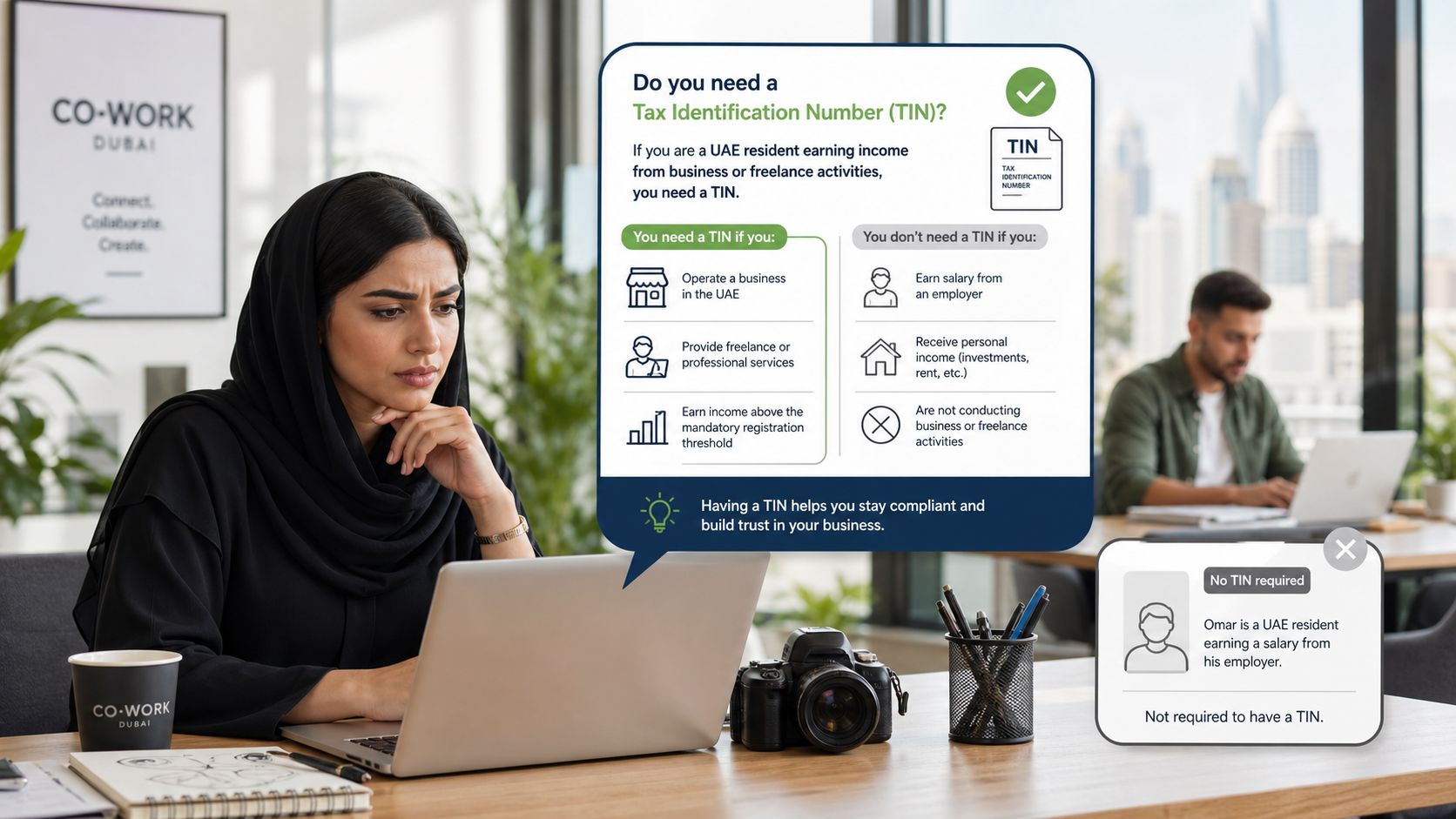
In the UAE, individuals typically do not have a standalone personal Tax Identification Number. For UAE tax purposes, the number businesses usually mean by “TIN” is the 15-digit TRN, which is the Tax Registration Number issued through the Federal Tax Authority process.
Who usually doesn't need one
If you're a resident with no business income, you're generally chasing the wrong document. The UAE does not issue a general Tax Identification Number for individuals without business income. Only natural persons with business turnover exceeding AED 1,000,000 must register for Corporate Tax, and the resulting 15-digit TRN serves as their sole “TIN”, as explained in this UAE TIN clarification guide.
That point matters for freelancers, consultants, and Golden Visa holders. Many of them spend time searching for a personal TIN because a foreign bank, marketplace, or compliance form used the term “tax ID” generically.
Practical rule: If you don't run a taxable business activity in the UAE, don't assume you need to apply for a tax number just because a form uses international tax wording.
Who does need one
A new LLC, e-commerce seller, trading company, or service business may need registration depending on its tax position. In UAE practice, the number that matters is the business tax registration number issued through the FTA. If you want a plain-English breakdown of what that number is, this explanation of what a TRN number means in the UAE is useful.
The practical distinction looks like this:
- A resident individual without business income usually doesn't need a TIN.
- A business making taxable supplies may need VAT registration.
- A natural person carrying on business above the Corporate Tax threshold mentioned above may need Corporate Tax registration.
- A company already asked by a customer, supplier, or marketplace for its tax number usually needs to confirm whether it should already be registered rather than guessing.
The only portal that matters
For UAE applications, the official online route runs through the FTA's EmaraTax portal. That's the system you'll use to create access, build the legal entity profile, submit the registration, track the status, and retrieve the approved number once the FTA issues it.
Many people often go wrong. They search broadly for how to get tax identification number online, find generic international advice, and then try to force the UAE process into that template. The UAE process has its own logic. If you follow EmaraTax in the right order, it's manageable. If you start with the wrong assumption, the portal feels much harder than it is.
Preparing for Your Online TIN Application
Good applications are built before you log in.
The smoothest submissions come from founders who prepare every document, confirm their registration basis, and make sure the business information is consistent across licence, bank records, and identification documents. The messy applications are the ones assembled from phone screenshots, partial PDFs, and turnover figures that nobody checked.
Confirm whether registration applies
For VAT, the threshold question is straightforward. The UAE requires businesses with taxable supplies exceeding AED 375,000 in the previous 12 months to register for VAT, and voluntary registration is allowed above AED 50,000, according to this UAE tax registration overview.
That means you should gather your sales data before you start. Don't estimate casually. Use actual records from invoices, sales platforms, contracts, or accounting reports.
If you're unsure whether VAT registration is the right path for your entity, this guide on how to register for VAT in UAE gives the broader process context.
A rushed turnover figure causes more trouble than a slow application. The portal can handle a delay. A bad declaration creates a bigger problem later.
Set up your access first
EmaraTax lets applicants register with email details, and UAE Pass can make access faster. If you have UAE Pass available, set it up before application day. It reduces friction when you need to log in again, review notices, or respond to clarifications.
This sounds minor until the FTA asks for something and the authorised person can't access the account smoothly. That's when a simple submission drifts into a long follow-up exercise.
Keep your document pack clean
The FTA process relies on uploaded scans. Poor file quality is one of the most preventable sources of friction. If your PDFs are clear but too large to send around internally for review, it helps to optimize PDF documents for email before final circulation, while keeping the text legible.
Use one shared folder for the final versions only. Don't upload “final2”, “latest final”, and “signed latest” copies interchangeably.
Document checklist for TIN/TRN application
| Document | Sole Establishment | Mainland LLC | Free Zone Company |
|---|---|---|---|
| Trade licence | Required | Required | Required |
| Memorandum of Association | If applicable | Required | Required where issued as part of company documents |
| Emirates ID copy | Required | Required for authorised signatory | Required for authorised signatory |
| Passport copy | Required | Required for partners or authorised signatory as applicable | Required for shareholders or authorised signatory as applicable |
| Tenancy contract | Required where applicable | Required where applicable | Required where applicable |
| Bank confirmation letter with IBAN | Required | Required | Required |
| Financial statements | Required where available for application support | Required | Required |
| Contact details and business profile information | Required | Required | Required |
What to check before upload
- Licence name consistency: The legal name in the application should match the trade licence exactly.
- Authorised signatory details: Use the same identity details that appear in the official records.
- Readable scans: Text, signatures, and stamps should be easy to read without zooming excessively.
- IBAN letter freshness: Make sure the bank letter matches the account you use for the business.
- Financial support: Keep your turnover support ready in case the portal or the authority asks for clarification.
Founders often assume the application itself is the hard part. Usually, the hard part is document discipline. Once your pack is organised, the portal becomes much less intimidating.
Navigating the EmaraTax Portal Step by Step
The most useful way to approach EmaraTax is to think in phases. Don't try to finish everything in one rush. The portal rewards accuracy more than speed.
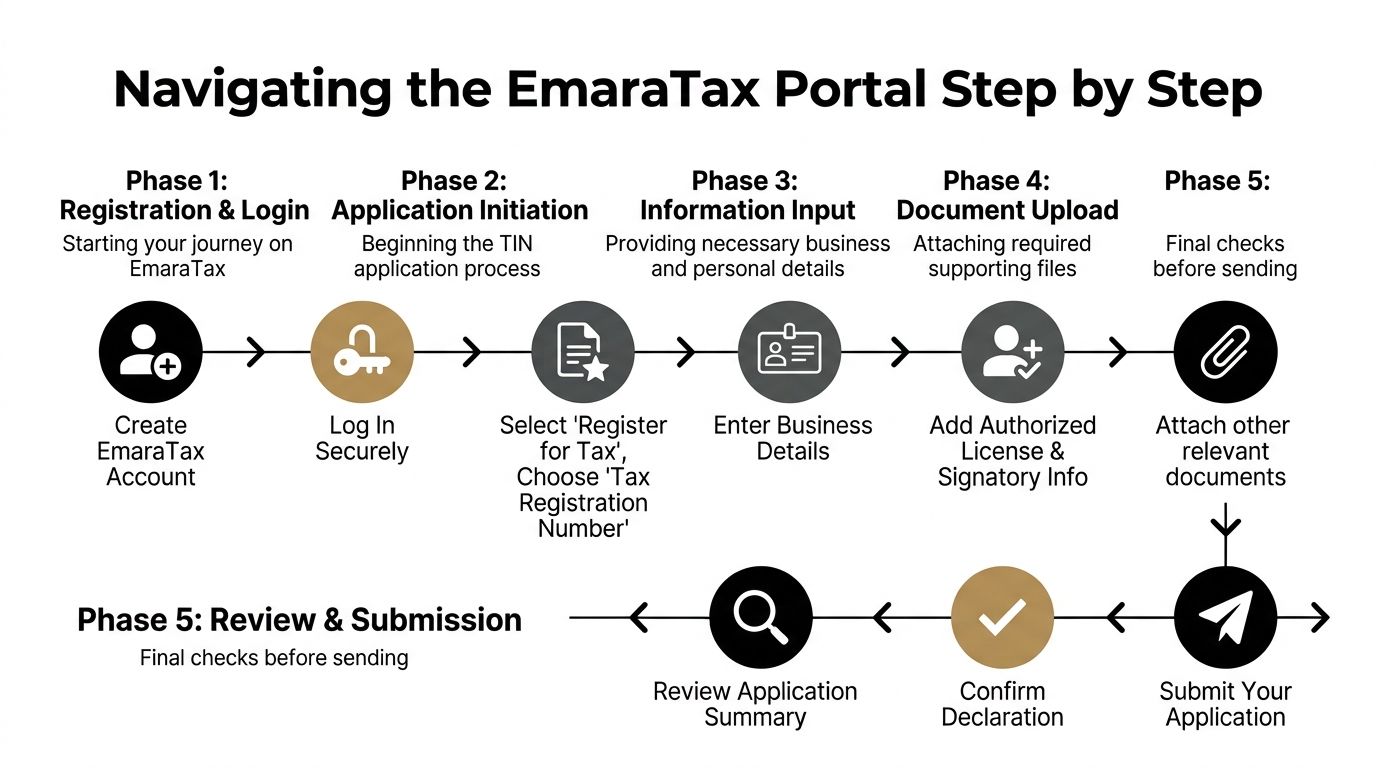
The official online process runs through EmaraTax, where applicants register using email or UAE Pass, complete the Taxable Person profile, and upload scans including the trade licence, MOA, Emirates ID, bank letter, and financial statements, as outlined in this EmaraTax application guide.
Create your account properly
Start by opening an EmaraTax account using your email details or UAE Pass. For first-time users, UAE Pass usually makes identity access more straightforward later, especially if more than one login session will be needed.
Use a business-controlled email address, not a temporary one. If a founder leaves, or an assistant used a personal inbox to register, recovering access later can become unnecessarily difficult.
When the account is live, don't jump straight into VAT registration. Many first-time applicants go off track at this point.
Build the Taxable Person profile first
The Taxable Person profile serves as the gateway. It holds the legal entity information the portal needs before it can process tax registrations properly.
Enter the business details carefully:
- Legal entity name
- Licence information
- Business activity details
- Address and contact records
- Authorised person information
If your documents and your profile don't match, the mismatch tends to surface later when the application is reviewed. Fixing it inside the profile first is easier than fixing it after submission.
Don't treat the Taxable Person profile as admin housekeeping. Treat it as the foundation of the whole registration.
Choose the correct registration path
Once the profile is complete, select the relevant tax registration action inside the dashboard. Businesses applying for VAT should use the VAT service path. Businesses handling Corporate Tax should use the Corporate Tax action under the entity profile.
The practical mistake here is choosing a tax registration because someone else asked for “a TIN” without confirming which registration is applicable. If a marketplace, supplier, or overseas client requested a tax number, that request doesn't by itself decide whether you need VAT registration, Corporate Tax registration, or neither. Your legal position does.
Complete the business and turnover details
This phase usually takes longer than founders expect because the questions look simple but require consistent answers.
You'll typically need to provide:
- Business activity information
- Turnover details
- Banking details including IBAN
- Contact details
- Customs or related registration details where relevant
- Authorised signatory and ownership information
Use the same source records you reviewed before opening the form. Don't switch between memory, rough spreadsheets, and old drafts of financial data.
If your accounting records aren't tidy yet, pause and organise them. Submitting weak figures quickly doesn't save time. It just moves the problem to the review stage or to later compliance work such as VAT filing support in the UAE.
Upload supporting documents without creating new problems
The upload stage is where many otherwise correct applications become messy.
Keep these habits:
- Name files clearly: “Trade Licence”, “MOA”, “Emirates ID”, “Bank IBAN Letter”.
- Use final versions only: Don't upload duplicate variants of the same document.
- Check expiry dates: ID and licence validity matters.
- Open every file before attaching it: Broken or blank uploads happen more often than people think.
Some applicants upload whatever they have and assume the reviewer will work it out. That's a bad bet. Reviewers don't know what you meant to submit. They only see what the file shows.
Review, submit, and track the application
Before submission, review the summary screen line by line. Focus on names, licence numbers, dates, and financial declarations. This is the point where small inconsistencies are still easy to correct.
After submission, EmaraTax issues an application reference number. Save it immediately. Keep it in your internal compliance file and send it to whoever inside the business tracks registration matters.
Once the FTA approves the application, the TRN appears in the EmaraTax dashboard and is also sent by email. The VAT certificate can then be downloaded directly from the portal for business use.
If you're wondering how to get tax identification number online without hiring outside help, this is the real answer. Get the profile right, get the documents right, and submit one coherent application.
Avoiding Common Application Rejections and Delays
Most delays aren't random. They're caused by the same handful of mistakes repeated by first-time applicants.
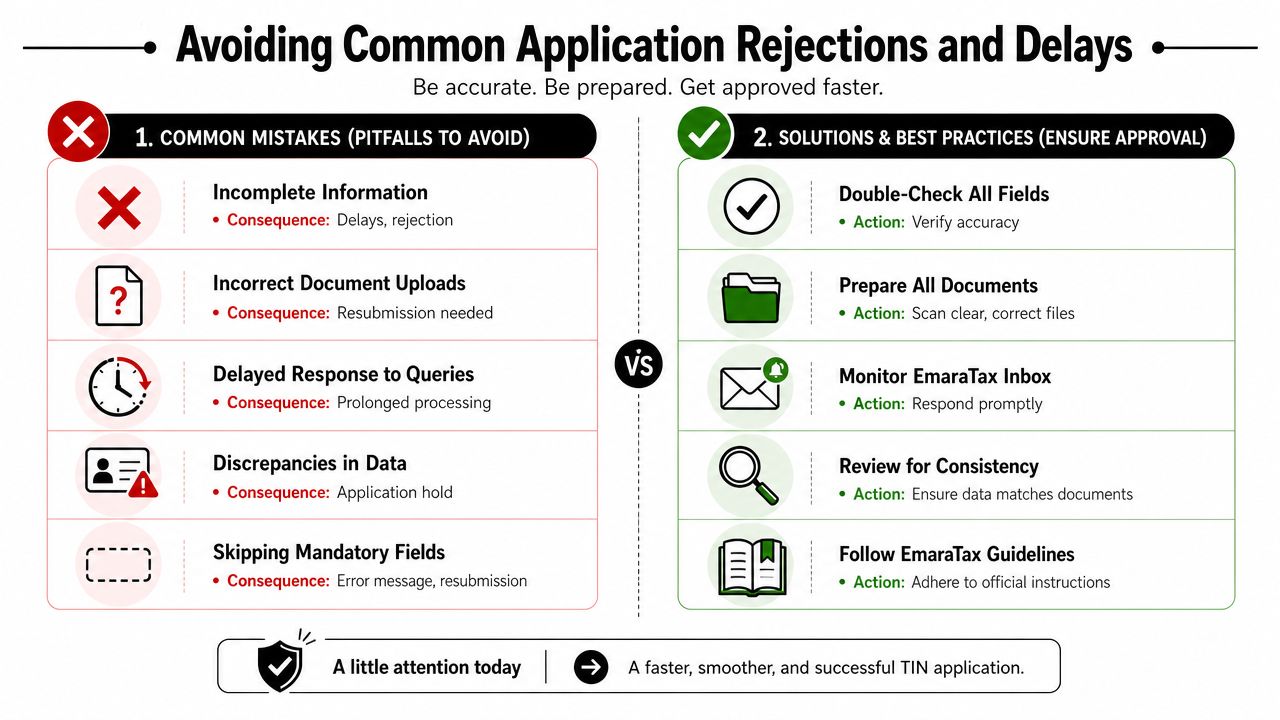
The most costly one is skipping the Taxable Person profile. Recent UAE guidance notes that most application rejections and delays happen because applicants omit that prerequisite and the system then rejects the case for missing legal entity details, as described in this EmaraTax bottleneck explanation.
Don't skip the setup. Complete the entity profile first
Applicants often think the profile is optional because it doesn't feel like the actual registration. In practice, it is the part that makes the actual registration work.
If you skip it, the portal lacks the legal entity detail it needs. That leads to rejection, clarification requests, or a stalled application that has to be corrected after submission.
Don't upload weak files. Use readable documents
Blurry scans, cut-off passports, unreadable stamps, and partial PDFs waste time. The authority can't verify what it can't read.
Do this instead:
- Scan from originals where possible
- Check every page before upload
- Use full-colour copies if stamps or signatures are faint
- Keep one reviewed folder of approved upload files
Don't let names and records drift apart
A common issue is simple inconsistency. The trade licence says one thing, the bank letter shows a variation, and the application form contains a shortened name typed from memory.
Use the exact legal wording from the core company record. If one supporting document uses a different format, flag it internally before you submit.
The FTA isn't trying to decode your business. It's checking whether the records line up.
Don't go silent after submission
The standard approval timeline for a complete application is typically 5 to 20 working days through the EmaraTax process, according to this UAE online TIN process summary. If the FTA asks for clarification, the clock usually feels much longer because the file pauses while information is corrected or expanded.
That means the inbox matters almost as much as the original form. Monitor the EmaraTax dashboard and the registered email address. Clarification notices don't resolve themselves.
A simple checklist that saves time
- Profile first: Never start registration before the Taxable Person profile is complete.
- Data match: Licence, ID, bank details, and application text should align.
- Readable uploads: If you need to zoom heavily, the reviewer probably does too.
- Financial support ready: Keep backup for the turnover figures you declared.
- Fast response: If the FTA asks for more information, reply with one complete package instead of multiple fragmented messages.
The businesses that get through this smoothly aren't always the largest or the most experienced. They're the ones that submit a clean file and stay responsive.
What to Do After Your TIN Is Approved
Approval is not the finish line. It's the point where tax registration becomes operational.
Inside EmaraTax, the approved number appears in the dashboard, and the certificate is available for download. Keep that certificate in your compliance folder and send it to whoever handles invoicing, procurement, accounting, and customer onboarding.
Update the documents your business actually uses
Your tax number isn't meant to sit in a PDF nobody opens. It needs to be reflected in the places where your business issues formal documents.
Update, at minimum:
- Tax invoices
- Quotes where tax details are shown
- Credit notes
- ERP or accounting software templates
- Supplier and customer onboarding packs where required
If your team uses old invoice templates, replace them immediately. Many businesses complete registration correctly and then keep issuing documents from a pre-registration template.
Verify before you transact
The FTA provides a public TRN Verification function inside its system. Use it when a supplier gives you a TRN and you want to confirm it before relying on it commercially.
This is a practical control, not just an administrative extra. It helps when onboarding a new vendor, checking counterparties, or reviewing transaction documents before payment runs.
Prepare for ongoing compliance
Once registered, the real discipline begins. Someone in the business needs to monitor filing obligations, maintain records, and keep the tax profile current when legal details change.
That's where many founders realise the registration itself was only one part of the job. If your accounting is still informal, approval is the time to tighten it. Waiting until the first filing deadline creates avoidable pressure.
Frequently Asked Questions About UAE TIN
Is TIN the same as TRN in the UAE
For practical UAE business use, yes. The tax number businesses usually mean is the 15-digit TRN, and that number functions as the TIN in the UAE tax context.
Can an individual get a personal TIN in the UAE
Usually no. There isn't a general personal TIN for individuals without business income. The issue usually arises because overseas forms use “tax identification number” as a generic term.
Do I need a trade licence before applying
In practice, yes. The UAE online registration process relies on legal entity details and supporting documents such as the trade licence and related records. Trying to apply before the business is properly documented usually leads nowhere.
Do free zone companies use a different portal
No. Free zone businesses still use the federal EmaraTax portal for tax registration. The company's jurisdiction changes the supporting documents and business context, but not the main online system used for registration.
How long does approval take
Processing depends on the type of registration and whether the file is complete. For applications submitted through EmaraTax, published guidance indicates 3 to 10 business days for Corporate Tax registration and 15 to 20 working days for VAT certificates in the UAE, based on this UAE registration timing summary.
Is the application itself paid
The registration application is generally handled through the portal. What founders often pay for is professional assistance, document preparation, review, and follow-up support. The official submission and advisory support are separate questions.
Can I retrieve my TRN online after approval
Yes. Once approved, the number appears in the EmaraTax account, and the VAT certificate can be downloaded from the portal. Keep both the certificate and internal records stored in a controlled place that finance and compliance staff can access.
If you want expert help with company setup, tax registration, VAT compliance, accounting, or wider UAE business support, Smart Classic Business Hub can guide you through the process from formation to ongoing compliance with practical, hands-on support.