
You usually discover this problem when you need something urgently. A bank asks for an OTP. The ICP portal sends a verification code. A health app won't let you proceed. The message goes to a number you no longer use, or worse, to a number that was originally added by a former employer or PRO during visa processing.
That's why emirates id change mobile number isn't a small admin task. In practice, it sits right in the middle of residency compliance, digital access, and business operations. If you're an entrepreneur, investor, employee, or family sponsor in the UAE, the mobile number linked to your Emirates ID affects how smoothly you can renew, sign, verify, and access essential services.
Why Your Emirates ID Mobile Number is Critical
A very common scenario in Dubai goes like this. A founder is ready to sign a trade licence document, approve a government transaction, or log into a banking portal. Everything is in order except the OTP goes to an old number. The issue isn't the app. The issue is the Emirates ID record behind it.

In the UAE, that linked mobile number often becomes your working access key for government and semi-government services. It's used for OTP verification across systems tied to identity, immigration, healthcare, and employment processes. Once it's outdated, simple tasks start failing one by one.
Where this becomes a real compliance issue
For business owners, the impact is wider than personal inconvenience. A mobile number linked correctly to the Emirates ID can affect licence e-signing, staff administration, visa processing, and access to portals that require verified identity. Official ICP data shows that 65% of mobile number updates are processed online, with a 98% success rate after OTP verification and payment, and changes reflecting instantly or within 48 hours. The same source notes that 70% of mainland trade licences require an ID-linked mobile for e-signing via this ICP update overview.
Practical rule: If your number has changed, don't wait until a renewal, licence signature, or health verification fails. Update it before you need it.
This is also a high-volume service. During the post-COVID residency renewal surge, the ICP processed over 1.2 million Emirates ID data updates in a single year, with mobile number changes representing approximately 15% of those transactions, according to this UAE update guide. That tells you two things. First, this problem is common. Second, getting ahead of it is far easier than fixing it under pressure.
Gathering Your Documents for a Smooth Update
Most failed applications don't fail because the service is difficult. They fail because the applicant starts too early, with missing details or the wrong reference number. Good preparation makes this process quick.
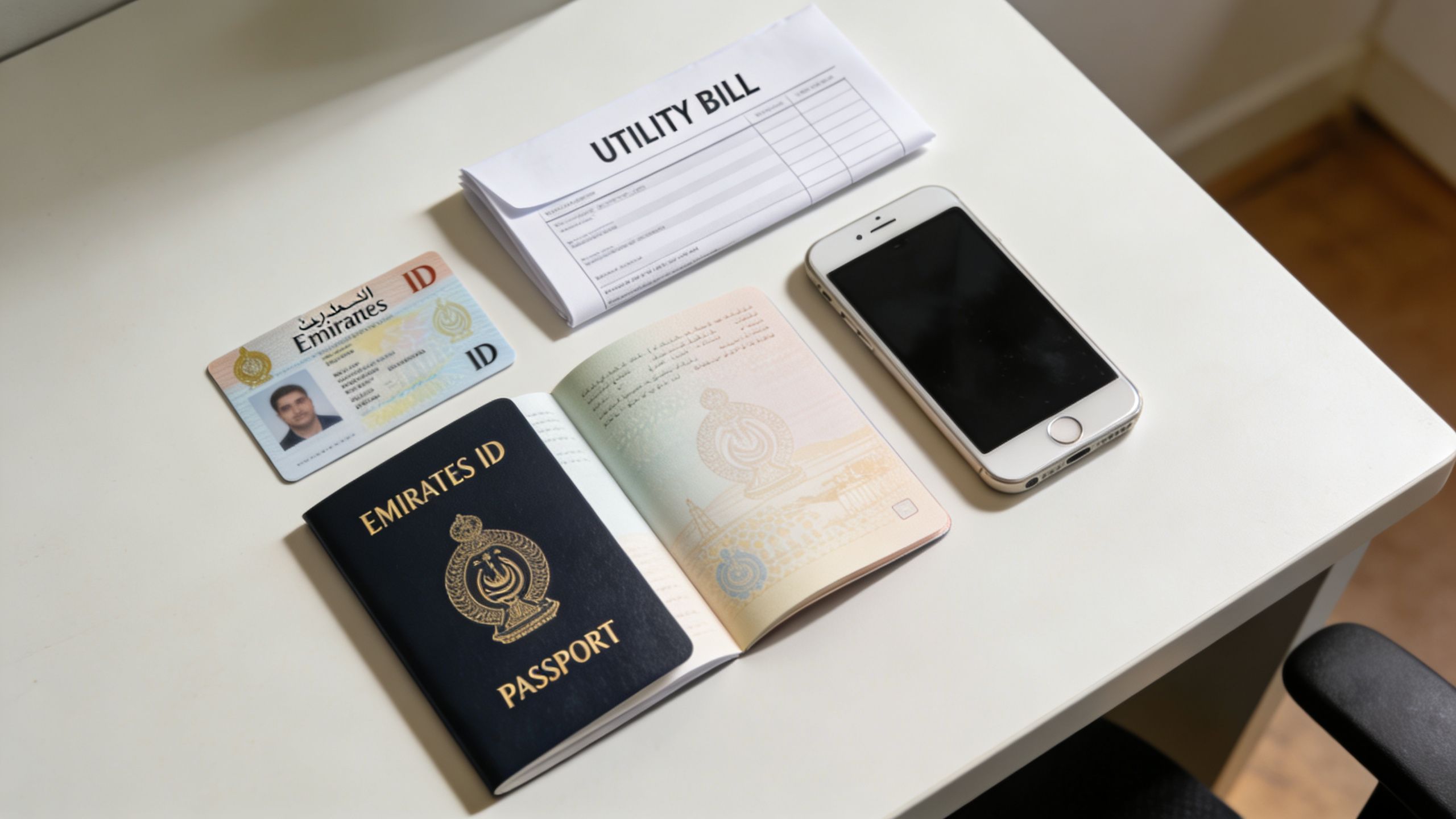
Keep these ready before you log in
Your Emirates ID details: You'll need the card itself or at least the ID number exactly as registered. If your ID is under renewal or another related process, check the record carefully before you submit anything else.
Your new UAE mobile number: It must be active and able to receive OTP messages immediately. If the SIM is brand new, test it first. A number that exists but hasn't fully activated can cause avoidable delays.
Passport copy and residency details: The system may cross-check your identity file against passport and visa records. If your passport is expired or close to expiry, resolve that first.
Visa file number: This is one of the biggest trouble spots, especially for Dubai files where formatting differs from other emirates. Entering the wrong file sequence is a common reason applications stall.
Address details: The online process typically asks for address information such as emirate, building or unit details, and P.O. Box information where applicable.
UAE Pass makes the process easier
If you already have UAE Pass, use it. In practice, it removes a lot of friction because your identity is authenticated before you start the amendment request. That usually means fewer manual entry issues and a cleaner workflow.
If you're still waiting on identity-related formalities, it helps to understand how those stages connect. This guide on biometrics for Emirates ID is useful if your update sits alongside a fresh visa or ID issuance process.
Bring all of this together before opening the portal. The people who finish in one sitting usually aren't faster typists. They're better prepared.
How to Change Your Emirates ID Mobile Number
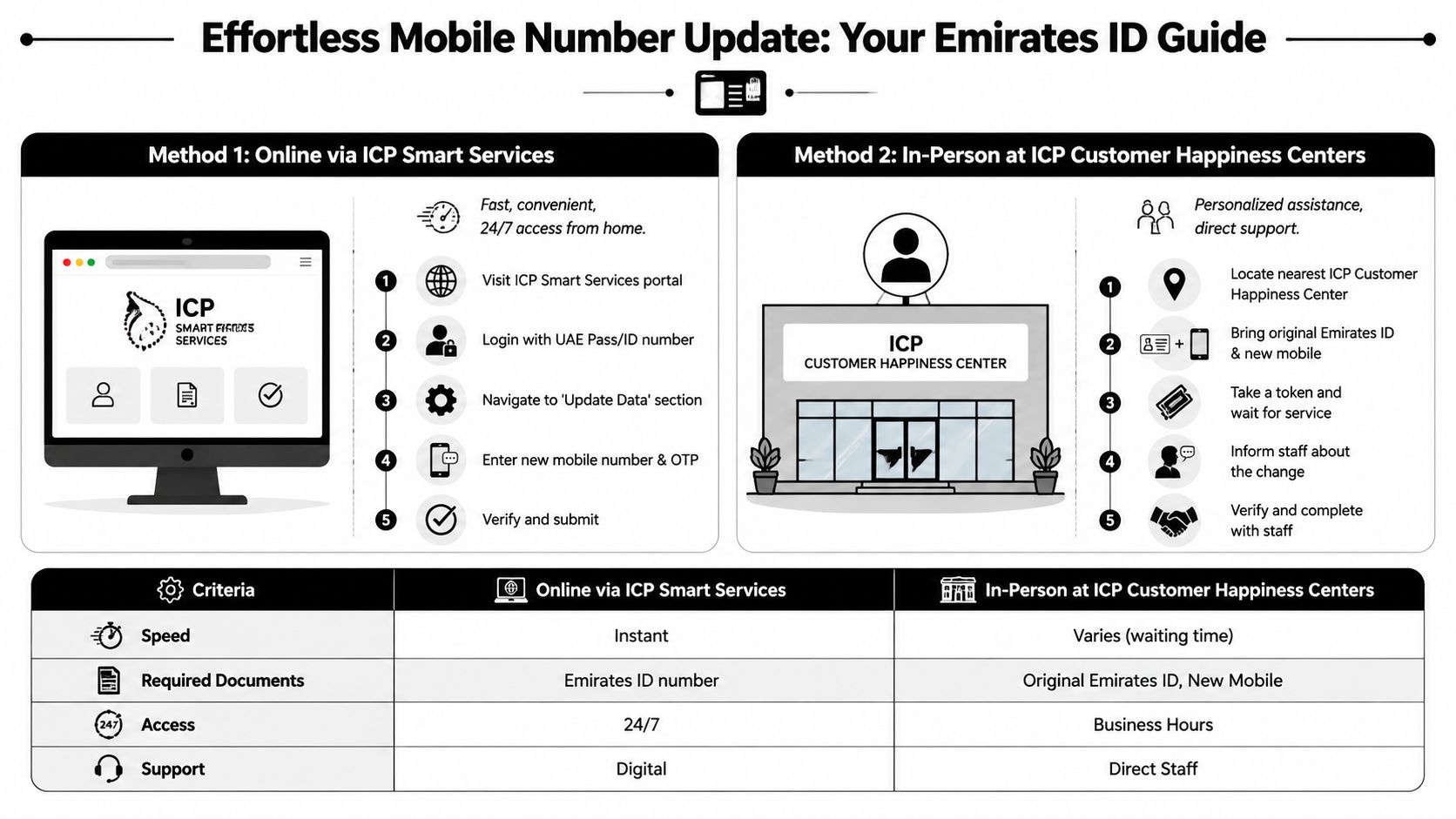
The two practical routes are online through ICP Smart Services or through a typing centre. For most residents, online is the first choice. For complicated records, nervous applicants, or people with mismatched immigration details, a typing centre can still be useful.
The online method through ICP Smart Services
If you have UAE Pass, this is the cleanest route.
- Open the ICP portal or UAE ICP app and sign in with UAE Pass.
- Go to Smart Services, then find the personal information update service.
- Load your profile using your Emirates ID details.
- Select the mobile number field for editing and enter the new UAE number.
- Complete OTP verification on the new number.
- Add the required address details and finish the payment step.
- Submit and save the reference number for tracking.
The expert workflow data provided for UAE Pass users describes a fully digital process on the ICP portal or app, including OTP validation and payment, with a 92% first-attempt success rate for UAE Pass users in the referenced material at this video explainer.
The online method without UAE Pass
This route works, but it requires more care. Instead of relying on pre-authenticated identity, you'll usually search by residency file number or other visa-linked details. That's where manual errors creep in.
Use the file number exactly as shown in your visa record. Don't guess separators, sequence blocks, or emirate formatting. If you've recently changed visa category, renewed status, or moved between company sponsorship and investor status, double-check that you are pulling the current file data.
When a typing centre is the better option
Typing centres are helpful in three situations:
- You don't have UAE Pass
- Your file details don't match across systems
- You're already dealing with a visa amendment, renewal, or linked admin task
A good typing centre doesn't replace the official process. It helps you enter the right information, package the request properly, and avoid resubmitting for simple errors. That matters when time is tight.
If your case is straightforward, online is usually better. If your case involves old employer records, investor changes, or multiple pending applications, assisted submission often saves time.
Method comparison
| Method | Best For | Cost (Approx.) | Processing Time | Our Recommendation |
|---|---|---|---|---|
| Online ICP | Residents with correct records, active UAE mobile, and preferably UAE Pass | Official fee applies | Can reflect instantly or within normal processing window | Best first option for most people |
| Typing Centre | Applicants with file confusion, no UAE Pass, or linked visa issues | Official fee plus service charges where applicable | Depends on submission quality and queue | Best when accuracy matters more than speed of self-service |
A quick note on cost. The verified data contains different fee references from different materials, so the safest practical approach is to check the current fee on the ICP channel you're using before payment. Don't rely on an old screenshot, blog post, or WhatsApp forward.
One useful extra check before you submit
If your application is tied to a fresh ID process and you need to update photos or supporting identity materials elsewhere in the workflow, it can help to prepare them properly. This tool for an Emirates ID photo maker for residents is a practical resource when you need compliant photo preparation alongside ID-related admin tasks.
Checking Your Update Status and Next Steps
Once you submit the request, the most important thing is the reference number. Keep it. Without it, follow-up becomes slower and more frustrating than it needs to be.
What to look for after submission
You'll usually receive a status trail by SMS or email, depending on the channel used. Common statuses include:
- Pending: The request has been received and is under review.
- Approved: The mobile number change has been accepted.
- Returned or rejected: Something needs correction before approval.
If you need to monitor progress, use your ICP application reference and follow the status through the relevant tracking channel. This page on Emirates ID tracking is a useful reference for understanding how those status checks work in practice.
Don't stop at approved
Approval is not the final test. The essential test is whether the new number receives OTPs across the services you use.
Try one live verification after approval. Log into a government portal, trigger a known OTP flow, or check another service connected to your ID record. If the code reaches the new number, the update is working in the way that matters.
An approved status is administrative confirmation. A successful OTP is operational confirmation.
If the number still doesn't work where expected, give the linked systems a little time to sync, then test again before escalating.
Troubleshooting Common Errors and Delays
A mobile number update often looks simple until the request stalls for a reason the portal does not explain clearly. For business owners, investors, and small teams, that delay can spill into bigger problems. Missed OTPs can hold up visa renewals, partner record changes, and access to government platforms tied to your Emirates ID.

File number mismatch
This is one of the first places I check when a client says the system is rejecting a valid update. A small entry mistake can pull the wrong record or stop the request before it reaches review.
What helps:
- Check the file number against the current visa or immigration record, not an older screenshot.
- Confirm the format carefully, especially if the record was issued in Dubai and the file layout differs from another emirate.
- If the portal loads unexpected personal details, stop there and verify the record before paying.
What causes repeat delays:
- Guessing the file number and trying multiple times.
- Using a cancelled visa record or an outdated copy from a previous residency stage.
- Assuming all emirates use the same formatting logic.
OTP not received
In many cases, the update request is fine but the number is not ready to receive verification traffic. New SIMs are the usual culprit. They may handle calls first, while OTP delivery takes longer to settle.
Start with the basics:
- Test the SIM with a real call and SMS: Do this before starting the amendment.
- Use a UAE mobile number: The process is built around local telecom validation.
- Wait and retry if the line was activated recently: Immediate OTP use is not always reliable.
If the number is still failing after activation checks, look at the wider file instead of retrying blindly.
Passport or visa validity issues
Sometimes the mobile number is not the problem. The request gets blocked because another identity record is expired, inconsistent, or already under amendment.
Check for:
- expired passport details
- residency records close to expiry
- pending immigration or identity amendments on the same file
This matters more than many applicants expect. If your Emirates ID record is due for a broader amendment cycle, it is often more efficient to fix the underlying issue first and then renew your Emirates ID record properly, rather than forcing a mobile update through a file that is already restricted.
Delays that signal a bigger compliance issue
For employees, one rejected update is usually a nuisance. For founders, investors, and SMEs, repeated rejection can point to a record mismatch that affects more than phone verification.
That is the trade-off. A quick self-service attempt saves time when the file is clean. If the request keeps failing, the cost of delay rises fast because the same record may be linked to visa processing, business ownership records, or future renewals.
When to Use PRO Assistance for Your Update
Some people should absolutely do this themselves. If your record is clean, your UAE Pass works, and you only need a simple mobile amendment, self-service is fine.
But there are cases where delegating is the smarter decision.
Cases where assistance makes sense
- Entrepreneurs with no time for rework: If a founder loses half a day to failed OTPs, rejected entries, and follow-ups, the actual cost is usually attention pulled away from the business.
- SMEs updating multiple employee files: One employee issue is manageable. Several updates across staff, renewals, and labour records can become messy fast.
- Investor and partner structures: If one person is linked to multiple visas, business roles, or older sponsorship records, accuracy matters more than convenience.
- Golden Visa and high-mobility cases: These files often connect to wider compliance activities. A small identity mismatch can ripple into other processes later.
What good PRO support actually adds
A competent PRO doesn't just “submit forms”. They check the file logic before submission, confirm which identity record is current, and spot conflicts between visa data, passport details, and ID-linked contact information.
This becomes even more useful when the mobile update sits alongside a broader renewal or identity cycle. If your record is already due for amendment or replacement, renew Emirates ID planning may be part of the same practical conversation.
For straightforward cases, DIY works. For linked corporate, investor, or employee matters, professional handling is often less about convenience and more about preventing avoidable compliance friction.
If you need help with an Emirates ID mobile update, a related visa issue, or a broader compliance task tied to your business setup, Smart Classic Business Hub can guide you through the process clearly and efficiently. Their Dubai team supports founders, investors, SMEs, and residents who want the job done correctly the first time.